
There’s no ‘forgot password’ button on Nostr. Your nsec is your account, and there’s no company that can reset it, lock it or hand it back to you. If someone else gets a copy of your nsec, they can do everything you can, for as long as they like.
That sounds scary, but a leaked key isn’t the end of your Nostr life. This guide walks through what to do if it happens, and how to back up your key properly so it hopefully never does.
What a Leaked Key Means
Anyone with your nsec can:
- post, reply and react as you
- change your profile, including your Lightning address, so zaps meant for you go to them
- change who you follow
- read every private message you’ve ever sent or received, including private DMs
- send deletion requests for your notes
There is no way to ‘change’ a key in the Nostr protocol today. Several proposals for key migration and revocation are being discussed, but none has been adopted yet. The only fix is to move to a new key, and bring your people with you.
Seeing posts or profile changes you didn’t make? That usually means a leak, but not always. Some apps have been caught showing forged events without checking their signatures. Check your profile in two or three different apps before you act.
What to Do, Step by Step
Move quickly. Until you’ve moved, whoever has your key can keep making changes.
1. Save What You Can
Your profile and follow list can be overwritten, and relays only keep the latest version. Before anything else, copy your follow list. With nak installed, this saves it to a file:
nak req -k 3 -a your-hex-public-key -l 1 wss://relay.damus.io > follows.json
Also note down your profile details, Lightning address and NIP-05.
2. Create a New Key
Create your new key somewhere safe from day one: in a signer like Amber or Clave, or in your Passport Prime Vault if you have one. Back it up before you use it (see Back Up Your Key below).
3. Announce the Move From Both Accounts
- From the old key, post a note saying the key is compromised and giving your new npub, and pin it if your app allows. Update the old profile’s name and bio to say the same. The attacker may change it back, but many people will see it first.
- From the new key, post a note explaining the move and linking to the old account.
- Tell close contacts directly, through another channel if you can, so they know which account is really you.
4. Point Everything at Your New Key
- NIP-05: update your
nostr.json(or your provider) to your new key. Anyone looking you up by name will find the new account. See our NIP-05 guide. - Lightning address: add it to your new profile, and keep an eye on the old profile in case the attacker swaps in their own.
- Wallet connections: revoke every Nostr Wallet Connect connection in your wallet and set up new ones. NWC connections have their own secrets, separate from your nsec, but there’s no reason to leave them in place. See Set Up Zaps Properly.
- Signer sessions: disconnect every app from your signer.
5. Rebuild Your Follows
Re-follow people from your new account, starting with the list you saved in step 1. Ask friends to follow your new npub and to share your announcement, since the people who follow you are the hardest part to move.
6. Assume Your Messages Are Exposed
Treat everything in your DMs as readable by someone else. If anything sensitive was in there, such as passwords, addresses or wallet details, change it now. Stop using the old key completely, even for reading.
Back Up Your Key
A good backup lets you keep your nsec off the internet and in as few places as possible, and means a broken or stolen phone doesn’t cost you your account.
 Keep your backup offline and in more than one place
Use an encrypted backup. An ncryptsec (NIP-49) is your key locked with a password. Even if someone finds the backup, they can’t use it without the password. Amethyst and noStrudel can export one, and nak key encrypt creates one in a terminal. Store the password separately from the backup.
Keep it offline. Write it down on paper, or stamp it into steel for fire and water resistance, and keep copies in more than one safe place. Never keep your nsec in cloud notes, screenshots, email or chat messages.
Test it. Restore your backup into a signer on another device before you rely on it.
Some apps can show your key as 12 seed words (NIP-06). The Nostr spec now marks seed words as unrecommended in favour of a single nsec, and not every app can restore from them, so check yours can before relying on them.
Passport Prime and the Vault
If you own a Passport Prime, its Vault app is a secure, offline home for your Nostr keys. The Vault can generate Nostr keys for you, alongside Bitcoin seeds and passwords, all derived from Passport Prime’s master key.
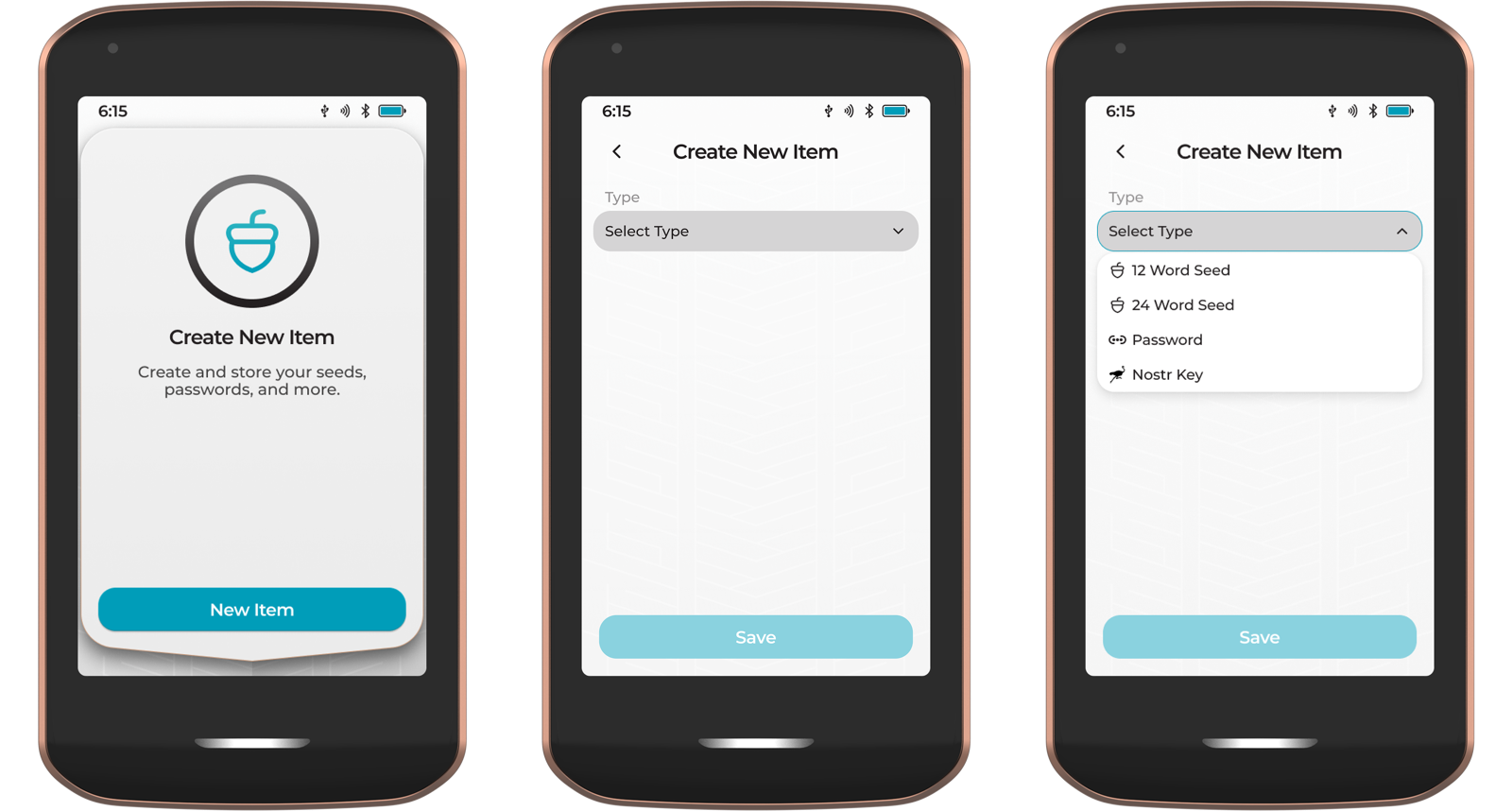
Creating a new Nostr key in the Vault
Because every key comes from your master key, one backup of Passport Prime covers every Nostr key it has ever made. With Magic Backups turned on, your Vault items are encrypted and backed up automatically. Lose your phone, wipe your signer or drop your backup in the bath, and Passport Prime can re-create the same key.
That makes the Vault especially useful when a key leaks:
- Archive the compromised key in the Vault so you know not to use it.
- Tap the three-dot menu, choose New Item, select Nostr Key and give it a name. Passport Prime creates a brand new key at the next index, already covered by your existing backup.
- Open the new item and tap View Key. Passport Prime shows your npub, then your nsec, as text and as a QR code.
- Scan the nsec QR code into your signer app, such as Amber, and carry on with the steps above.
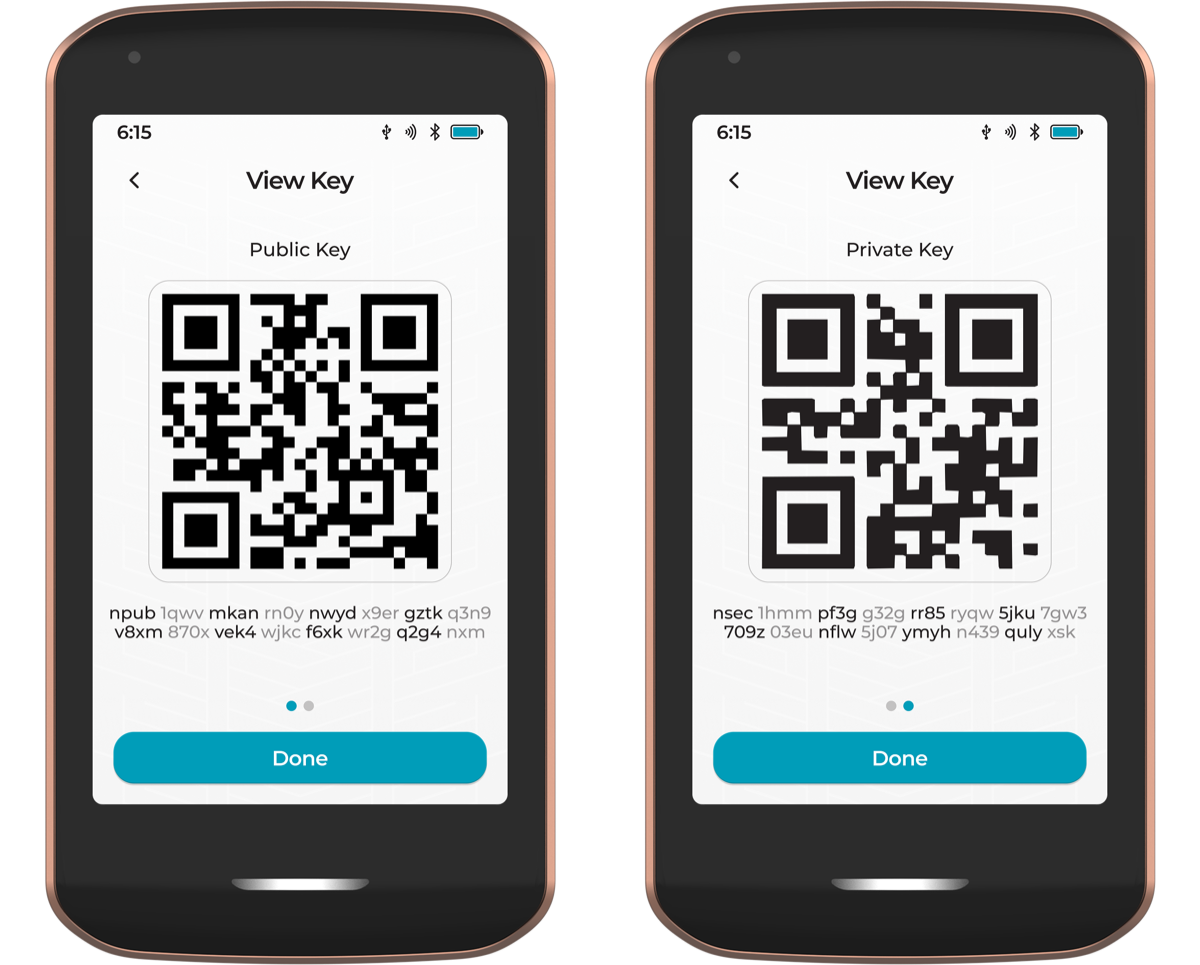
Your npub and nsec, shown on Passport Prime
You can also create keys for friends and family in the Vault. If they ever lose access, you can re-create their key and get them back into their account.
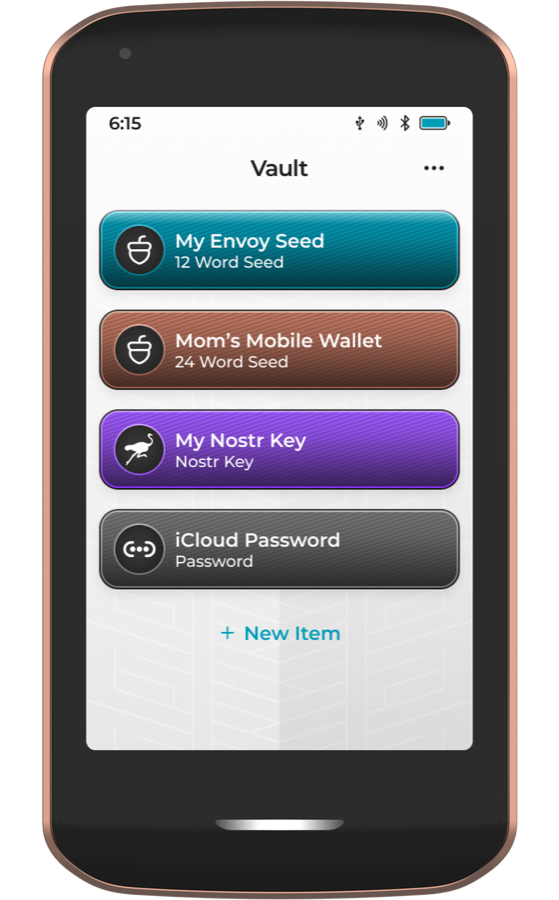
Seeds, passwords and Nostr keys in one Vault
Read the full Vault guide in Foundation’s docs.
Keep It From Happening Again
- Keep your nsec in one place, a signer like Amber or Clave, or a browser extension, and log in to everything else through it. See Secure your Nsec on iPhone and Desktop.
- Never paste your nsec into a website or a new app. If an app only accepts a pasted nsec, don’t use it with your main account.
- Install apps and extensions only from official sources.
- Review connected apps in your signer every so often, and remove the ones you don’t use.
If you found this post useful, please share it with your peers and consider following and zapping me on Nostr. If you write to me and let me know that you found me via this post, I’ll be sure to Zap you back! ⚡️